Reading .apkg: importing Anki decks into a Flutter app
Reme’s question banks are native JSON files, but the ecosystem I actually
want to pull questions from is Anki’s — years of shared decks, and my
own politics bank originally authored as Anki notes. So Reme imports
.apkg files directly on-device. This note documents what the format
turns out to be, the parsing pipeline, and one design decision that will
surprise Anki users: imported cards do not carry their review history.
What an .apkg actually is
Unzip it and you find two kinds of things:
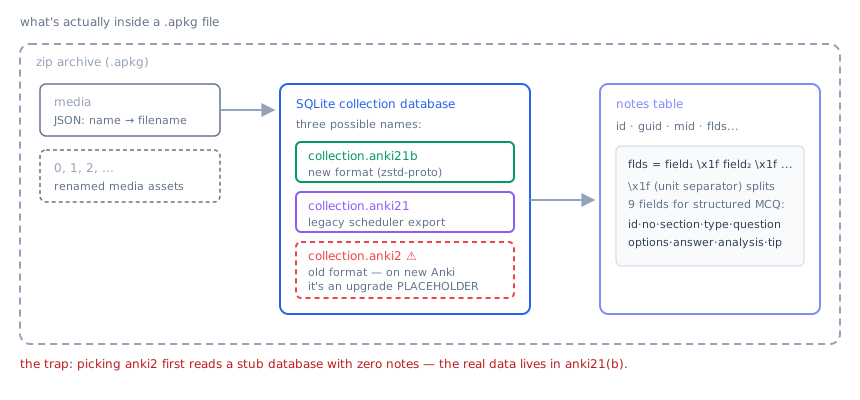
- a
mediafile (JSON mapping numeric names to real filenames) plus the media assets themselves, renamed to0,1,2, …; - one or more SQLite databases named
collection.anki21b,collection.anki21, orcollection.anki2.
The database naming is where the first trap lives. These are not interchangeable:
| file | what it is |
|---|---|
collection.anki2 | the classic format. On exports from modern Anki (2.1.28+), this file is an upgrade placeholder containing zero or stale notes |
collection.anki21 | the same schema, exported by the legacy-scheduler compatibility mode; contains the real data for most current decks |
collection.anki21b | the new-format export: the schema is the future one and pages are zstd-compressed protobuf blobs |
Pick anki2 first and you read an empty collection while the actual
1247-question deck sits in anki21 next to it. Reme probes in strict
priority order — anki21b → anki21 → anki2 — and fails loudly if no
recognizable collection exists.
Inside the database, everything about note content lives in one column:
notes.flds, a single string with fields joined by \x1f (ASCII unit
separator). Deck names are in col.decks, a JSON blob.
The parsing pipeline
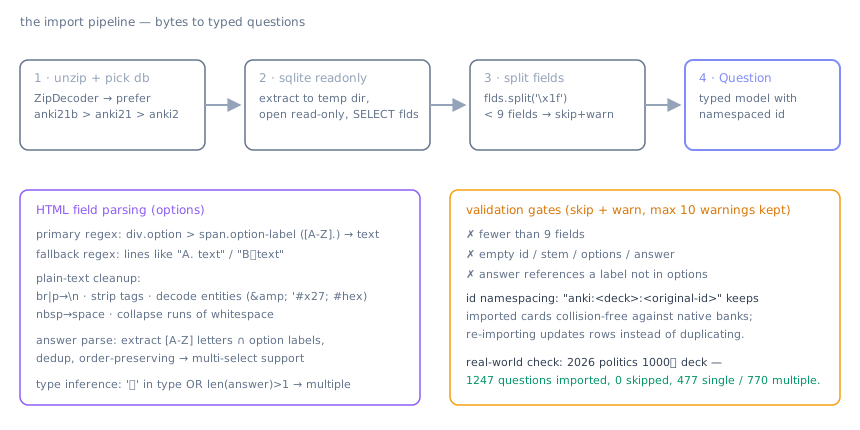
Four stages, all in Dart (package:archive for the zip,
package:sqlite3 opened read-only against a temp-file extraction):
Stage 1–2: get a queryable database. Extract the chosen collection file to a temp directory and open it read-only. No ORM, no migrations — the schema belongs to Anki, we only read.
Stage 3: split fields. flds.split('\x1f'). Reme targets a
9-field structured layout:
id · no · section · type · question · options · answer · analysis · tip.
Fewer than 9 fields means the note isn’t a structured MCQ — skip it,
count it, keep a warning.
Stage 4: build typed questions. This is where the real work hides. Anki note bodies are HTML, and every field needs different treatment:
- Options come from
<div class="option"><span class="option-label">A.</span>…</div>blocks, parsed with a regex over the raw HTML. A fallback pattern handles decks that just use plain lines likeA. text/B、text(the full-width 、 included — Chinese-authored decks use it). - Everything else goes through a plain-text normalizer:
<br>/</p>become newlines, remaining tags stripped, HTML entities decoded (&,', hex forms),\u00a0collapsed to spaces, whitespace runs squashed. - The answer field is parsed by extracting capital letters that actually exist among the option labels, deduplicated, order-preserved — which makes multi-select answers fall out naturally.
- Question type is inferred: if the type field mentions 多 (multiple) or more than one answer letter survives validation, it’s a multiple-choice; otherwise single.
Every imported ID is namespaced as anki:<bankId>:<original-id>, so
imported questions can never collide with native JSON-bank questions,
and re-importing the same deck updates rows instead of duplicating them.
Validation gates
Bad decks are the norm, not the exception. Each note must pass four gates or it is skipped: enough fields, non-empty id/stem/options/answer, and every answer label must reference an existing option. Skips are counted; the first ten warning messages are kept for the import report. Silent data loss is worse than partial import with a visible count.
The end-to-end check is a golden test against a real export: the 2026
politics “1000题” deck must produce 1247 questions, 0 skipped, 477
single-choice, 770 multiple-choice, deck name “1000题” read from
col.decks. That test has caught more regressions than any unit test on
the individual regexes.
The decision: content moves, memory does not
Here is the surprising part for Anki users. An .apkg also carries your
scheduling history — per-card ease factors, intervals, review logs in
the cards and revlog tables. Reme ignores all of it. Imported cards
start as new cards under FSRS.
Reasoning:
- SM-2 state (ease factor, interval) and FSRS state (difficulty, stability) are not interconvertible without assumptions. FSRS ships an optimizer meant to fit its weights to a revlog; half-mapping SM-2 numbers into FSRS parameters poisons both.
- My exam timeline restarts anyway: a politics question reviewed eight months ago at SM-2 ease 2.5 says little about whether I can answer it today under exam conditions. Fresh scheduling measures the present, which is the thing I actually care about.
- Keeping the importer content-only keeps it testable and small — no scheduler-coupled migration logic that breaks when either algorithm changes.
The cost is honest re-learning of cards you already knew, concentrated in the first weeks after import. The first-pass mastery rule from the FSRS post softens exactly this case: questions you answer correctly on first sight jump straight to long intervals instead of grinding through short ones.
Open problems
collection.anki21bsupport is priority-order only right now — the zstd-compressed protobuf payload of the true new format still needs a reader before modern Anki exports work without the compatibility flag.- Media is catalogued but not yet rendered: LaTeX-cached images and audio referenced in fields would make imported decks fully self-contained.
- If demand exists, reading
revloginto a neutral CSV sidecar would let users keep their history without coupling the importer to any scheduler’s internal state.